How to Remove Extra Spaces in Excel Without the TRIM Function
Updated 2026-10-11 · Free · Works in your browser
Quick answer
TRIM() needs helper columns, only cleans visible spaces, and leaves tabs and non-breaking spaces alive. The free online Trim Whitespace tool removes leading and trailing whitespace from every text cell on every sheet in one pass, optionally collapses doubled inner spaces, and reports exactly how many cells changed.
Skip the reading — jump straight to the free tool: Trim Whitespace in Excel →
How to Clean Spaces Online (3 Steps)
- Open the free Trim Whitespace tool and drop in your .xlsx, .xlsm, or .xls workbook. Processing is fully local — the file is never uploaded.
- Pick the two cleanup options: collapse repeated inner spaces into one (off by default) and treat NBSP / full-width spaces as regular spaces (on by default).
- Click Clean spaces — every text cell on every sheet loses its leading and trailing whitespace, including tabs and line breaks.
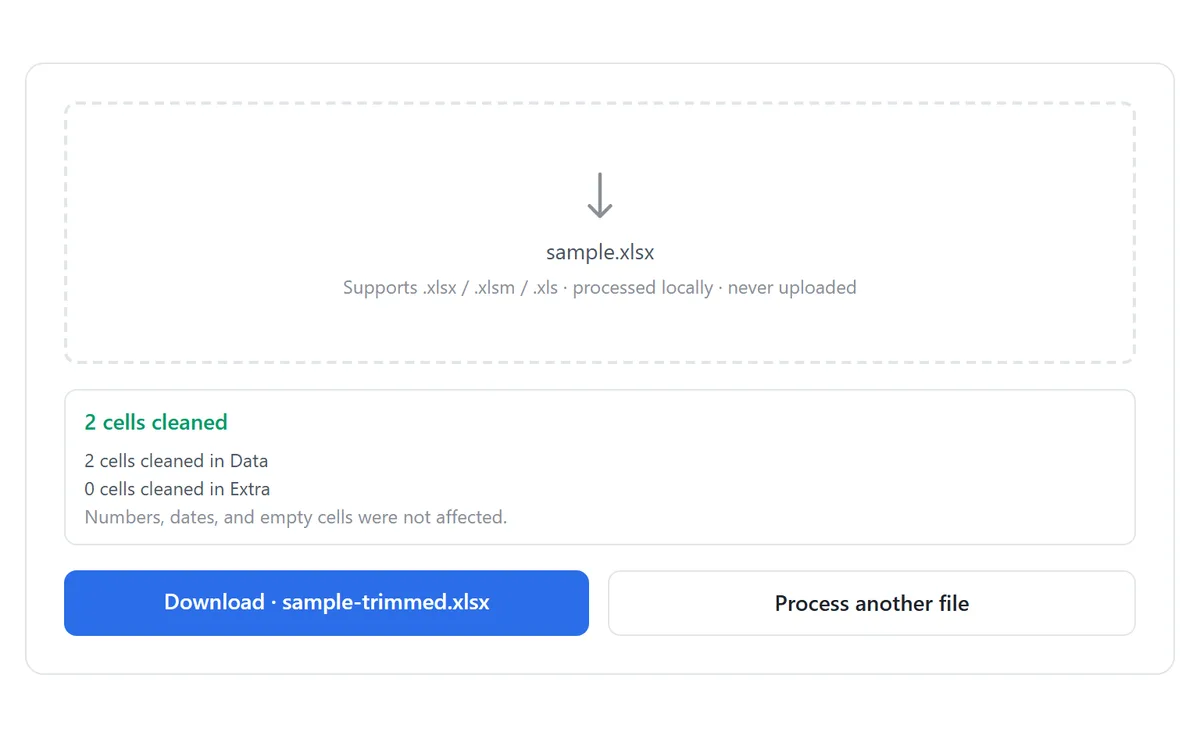
- Review the report: each sheet lists how many cells changed, with a total at the top.
- Download the cleaned workbook as your-file-name-trimmed.xlsx.
Trimming always cleans both edges of a text cell. Keep collapse off if double spaces between words are meaningful in your data; turn it on when you want “ Ada Lovelace ” to come out as “Ada Lovelace”.
Why Stray Spaces Break Everything
A trailing space is invisible on screen and toxic in a spreadsheet. The same “NYC” and “NYC ” are different strings to Excel, which produces the classic mystery failures:
- VLOOKUP/XLOOKUP return #N/A even though both values “clearly match”.
- Remove Duplicates refuses to catch rows that differ only by a space.
- Pivot tables split one category into two — “Pending” and “Pending ”.
- Sort orders interleave differently than expected, and COUNTIF undercounts.
The worst offenders are invisible characters: non-breaking spaces (NBSP, CHAR(160)) pasted from websites, full-width spaces from CJK text, and tabs left by TSV exports. TRIM() does not touch any of them.
Manual Method: TRIM and Its Limits
- Insert a helper column next to the column you are cleaning.
- Enter =TRIM(A2) and fill down for the whole range.
- Copy the helper column, then Paste Special → Values back over the original — TRIM’s output is a formula, not clean text, until this step.
- Delete the helper column.
TRIM only removes the ordinary space character (CHAR(32)) at the edges and collapses only those inside. It leaves tabs (CHAR(9)), line breaks, NBSP (CHAR(160)), and full-width spaces exactly where they are — so a cell can be “TRIMmed” and still break your VLOOKUP. Handling those needs =SUBSTITUTE(A2,CHAR(160)," ") stacked on top, and the helper-column dance again.
The Find & Replace trick (replace two spaces with one, click Replace All repeatedly until “0 replacements”) does collapse doubled inner spaces without formulas — but it cannot see the invisible characters either, cannot touch leading/trailing tabs or breaks, and its “run it until it stops finding anything” loop is easy to give up on halfway.
Which Method Fits Which Situation
| Trim Whitespace tool | TRIM() + paste values | Find & Replace loop | |
|---|---|---|---|
| All sheets at once | Yes | Per column, per sheet | Per sheet |
| Tabs and line breaks removed | Yes | No | No |
| NBSP / full-width spaces | Yes (on by default) | Needs extra SUBSTITUTE | Manual Alt+0160 trick |
| Collapses doubled inner spaces | Optional, one click | Yes | Yes, repeated runs |
| Helper columns / formulas left behind | None | Two extra steps | None |
| Report of cells changed | Per sheet | No | “N replacements” popup |
Spaces rarely travel alone in dirty imports. Line breaks pasted into cells are the second most common artifact, and stray symbols like curly quotes or non-printable control characters are the third — each has a dedicated one-pass cleaner.
Tools Used in This Guide
Frequently Asked Questions
Will trimming change my numbers or dates?
No. Only text cells are touched — numbers, dates, and booleans are left exactly as they are, since whitespace cleanup on them is meaningless (or handled by a different fix: numbers stored as text).
Does it remove spaces between words?
Only if you enable “collapse repeated inner spaces”. By default, inner spacing is preserved exactly; edges are always cleaned.
Is my file uploaded to a server?
No. The workbook is parsed and rewritten entirely in your browser. Nothing leaves your device, and no sign-up is required.
What are NBSP and full-width spaces?
Invisible space characters that look like normal spaces: NBSP (CHAR(160)) comes from web pages, full-width spaces (U+3000) from CJK text. Both are treated as ordinary spaces and cleaned by default.
Why does the report show more changed cells than I expected?
Invisible characters count as changes. A cell that looked clean but held a trailing tab or NBSP shows up in the report — that is usually exactly the cell that was breaking a lookup.
Will my formatting survive?
Values, dates, and numbers are preserved. The output is rebuilt from cell values, so decorative cell styling is simplified — see the tool page for details.
Related Guides
Ready to try it on your own file?
Open Trim Whitespace in Excel — It's Free